
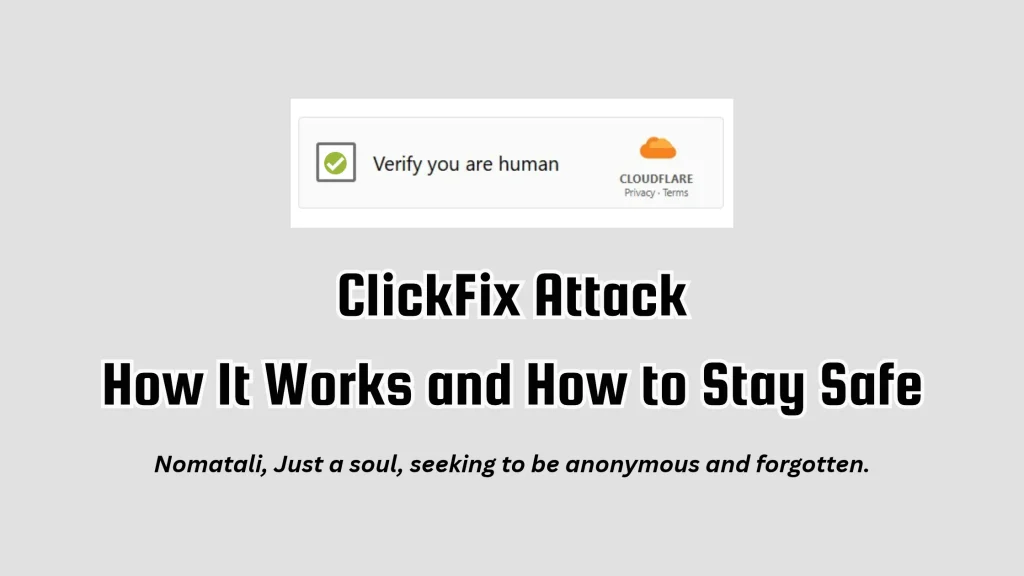
ClickFix Attack, How It Works and How to Stay Safe

ClickFix is a social engineering and phishing technique that tricks users into executing malicious commands on their own computers. Instead of relying solely on a malicious file download or an exploit against a software vulnerability, attackers manipulate victims into believing they must complete a verification step, fix a browser problem, or resolve an error by following instructions on a webpage.
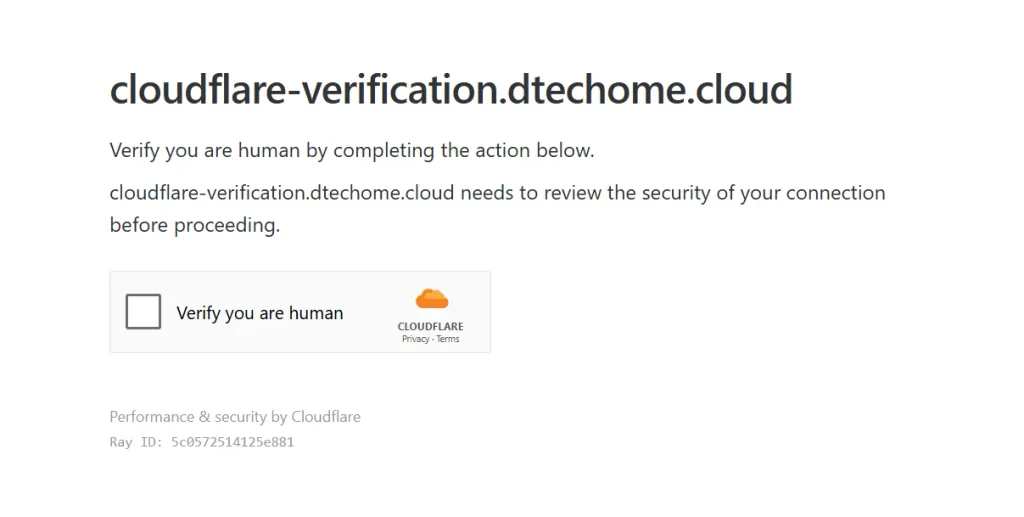
One common approach involves fake Cloudflare verification pages that imitate legitimate human-verification checks. Victims may be instructed to copy a command, open the Windows Run dialog or PowerShell, and paste the command themselves. If they follow the instructions, they can unintentionally execute malware, including information stealers, remote access tools, and other malicious payloads.
ClickFix is particularly concerning because it abuses normal user interactions and legitimate operating system features. Security controls designed to detect suspicious downloads or automated exploits may not immediately recognize an attack in which a user manually initiates the malicious process.
Understanding how ClickFix works, how to recognize its warning signs, and how to respond to a suspected infection is essential for both individual users and enterprise security teams.
What Is ClickFix?
ClickFix is an attack technique that uses deceptive instructions to persuade a person to execute attacker-controlled commands or scripts. It is a form of social engineering rather than a single malware family, software vulnerability, or standalone exploit.
Security researchers have documented ClickFix campaigns since early 2024. Attackers have used it to deliver multiple types of malware, including information stealers and remote access trojans. Microsoft has also documented campaigns targeting both Windows and macOS devices, although fake Cloudflare verification pages directing users to Windows commands remain a prominent example.
The technique is sometimes associated with pastejacking, a form of deception in which clipboard content is manipulated or users are tricked into pasting dangerous commands. In ClickFix attacks, the attacker exploits a person’s trust in familiar verification interfaces, error messages, or technical troubleshooting instructions.
Is ClickFix a vulnerability or a malware family?
No. ClickFix is best understood as a social engineering and malware delivery technique.
| Term | Meaning |
|---|---|
| ClickFix | The deceptive technique used to persuade victims to execute malicious commands. |
| Fake CAPTCHA | A fraudulent verification interface used as a lure. |
| Infostealer | Malware designed to steal credentials, browser data, cookies, and other sensitive information. |
| Remote access trojan (RAT) | Malware that can provide an attacker with unauthorized access to a compromised device. |
| PowerShell | A legitimate Windows scripting environment that attackers may abuse to execute commands. |
ClickFix does not require a specific CVE or an exploitable software flaw. The initial execution may occur because the user follows the attacker’s instructions. Consequently, there is no universal ClickFix patch, CVE identifier, or single affected software version. The relevant defenses involve preventing malicious execution, detecting suspicious behavior, and reducing the likelihood that users will trust fraudulent instructions.
How Does a ClickFix Attack Work?

A typical ClickFix campaign combines a deceptive webpage, a malicious command, a legitimate operating system utility, and a malware payload. The precise steps vary between campaigns, but the following sequence illustrates the common pattern.
1. Victim visits a deceptive page
A phishing link, advertisement, redirect, or compromised website leads to a fake verification screen.
2. Fake CAPTCHA or error message
The page claims that an additional action is required to verify the user or resolve a problem.
3. User copies and runs a command
The victim is persuaded to paste attacker-controlled content into a Windows command interface.
4. Malicious code executes
The command may retrieve or launch a script, loader, or malware payload.
5. Data theft or further compromise
Depending on the payload, the attacker may steal information, establish remote access, or attempt persistence and lateral movement.
Illustrative attack chain based on publicly documented ClickFix campaigns; not every incident includes every stage.
1. Initial access through phishing or compromised websites
The attack often begins when a victim visits a webpage that appears trustworthy. Common delivery methods include:
- Phishing emails containing links or HTML attachments.
- Malicious advertisements and traffic-redirection services.
- Compromised legitimate websites, including content management system websites.
- Fake download pages, browser error screens, and imitation CAPTCHA challenges.
A compromised website is especially deceptive because its legitimate reputation may cause visitors to lower their guard. A legitimate domain does not guarantee that every page, embedded script, or advertisement it serves is safe.
2. Fake Cloudflare verification and CAPTCHA pages
One recognizable ClickFix variant imitates Cloudflare verification or Turnstile challenges. The fraudulent page may display a message resembling “Verify you are human” or claim that an additional step is necessary to continue.
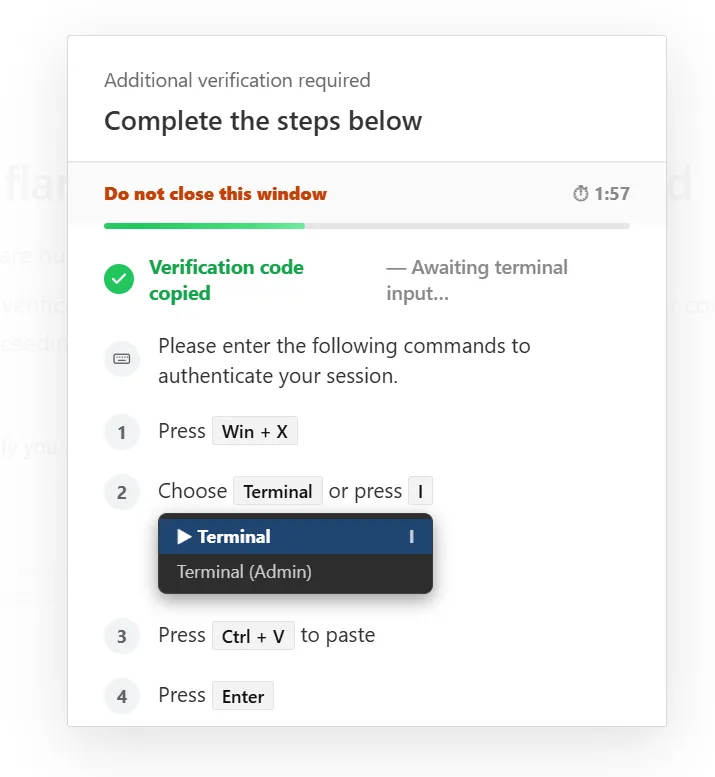
Instead of completing a normal browser-based challenge, the victim is instructed to interact with the Windows operating system. The instructions may ask the user to open the Run dialog, copy clipboard content, and press Enter.
The page may use familiar logos, realistic styling, countdowns, progress indicators, or fabricated error messages to make the process appear legitimate.
The critical warning sign is not the CAPTCHA itself. It is a webpage asking you to execute a command on your device to prove that you are human. Legitimate Cloudflare verification does not require visitors to run arbitrary PowerShell commands or paste scripts into Windows Run.
Attackers also imitate Google reCAPTCHA, browser errors, software update notices, and other familiar interfaces. ClickFix is therefore not limited to Cloudflare impersonation.
3. Clipboard manipulation and user-assisted execution
The attack becomes dangerous when the user follows instructions to copy and run a command.
Depending on the implementation, a page may place malicious text on the clipboard following a click, or instruct the victim to copy content and paste it manually. The visible instructions may describe the action as a verification step, browser repair, or routine troubleshooting.
The user may then open Windows Run with Win + R, or launch Windows Terminal or PowerShell, and execute the pasted content.
The underlying problem is that the operating system sees a user initiating a process. This can make the initial activity less obviously malicious than a conventional exploit or an automatically executed download.
However, manual execution does not make the attack invisible. Process creation events, command-line arguments, network connections, script activity, and endpoint security alerts may provide evidence of the compromise. Microsoft has also documented the forensic value of Windows Run history during investigations.
4. Malware delivery and execution
Once the command runs, the next stage depends on the threat actor’s implementation. A malicious command may invoke a legitimate Windows utility to retrieve a script or launch additional code.
Attackers may abuse PowerShell, Windows Script Host, or other legitimate utilities, a practice commonly associated with living-off-the-land techniques. Some campaigns use multiple stages to obscure the relationship between the initial command and the final payload.
Possible outcomes include:
- Installing an information stealer.
- Deploying a remote access trojan.
- Downloading a secondary malware loader.
- Establishing persistence or attempting to weaken security protections.
- Preparing the system for additional intrusion activity.
Not every ClickFix incident results in a successful infection. Outcomes depend on whether the victim executes the command, whether the payload is reachable, and whether endpoint security controls block the subsequent activity.
What Types of Malware Does ClickFix Deliver?
ClickFix is a delivery technique, so the malware installed after execution can change from one campaign to another. Security researchers have documented several payload categories.

1. Information stealers
Infostealers target saved browser passwords, authentication cookies, session tokens, cryptocurrency wallet data, and other sensitive information. Stolen credentials may enable account takeover even after the malware has been removed.

2. Remote access trojans
RATs can provide unauthorized remote control, surveillance, or interactive access to a compromised endpoint. Depending on their capabilities, attackers may use them for reconnaissance or to conduct further malicious activity.

3. Malware loaders
Loaders prepare a system for additional payloads. They may retrieve malware in stages, complicating detection and making the initial command an incomplete picture of the attack.

4. Other malicious tools
Depending on the campaign, follow-on activity may involve additional scripts, persistence mechanisms, defense evasion, or tools used to move through an organization’s network.
Microsoft has documented ClickFix campaigns associated with LummaStealer, XWorm, AsyncRAT, NetSupport, SectopRAT, and other payloads. These examples demonstrate the technique’s flexibility; they do not mean that every ClickFix page delivers these malware families.
Why Is ClickFix Effective?
ClickFix exploits the gap between what users believe they are doing and what their computers actually execute.
Abuse of legitimate system utilities
PowerShell, Windows Run, and other built-in utilities have legitimate administrative and troubleshooting purposes. Blocking every use of these tools is impractical, but allowing unrestricted script execution can give attackers opportunities to misuse them.
The challenge for defenders is to distinguish legitimate activity from suspicious combinations of commands, parent processes, network requests, and execution context.
Bypassing security expectations
Traditional security awareness often teaches users to avoid suspicious attachments and links. ClickFix extends the deception by persuading victims to take an additional action after visiting a page.
Because the victim initiates execution, an attack may not follow the same pattern as a conventional drive-by download. This can reduce the effectiveness of controls that depend on automatically detecting a malicious file or blocking an exploit. It does not mean that modern antivirus, endpoint detection and response (EDR), or application control cannot detect or prevent the attack.
Multi-stage execution and defense evasion
Some campaigns use obfuscated commands, staged downloads, in-memory execution, or legitimate Windows binaries to make their activity more difficult to investigate. Attackers may also attempt to evade endpoint defenses or establish persistence after the initial payload runs.
These techniques are not unique to ClickFix, but the initial user-assisted execution provides a convenient entry point for them.
Trust in familiar brands
A fake Cloudflare verification page or familiar browser error can appear more credible than an unfamiliar malware download. Attackers exploit the assumption that a well-designed page or a known brand means the requested action is safe.
Users should evaluate what a page asks them to do, not simply how authentic it looks.
Is ClickFix Detected by Antivirus Software?
ClickFix can be detected by security software, but detection is not guaranteed at every stage.
Modern endpoint protection products may identify malicious scripts, suspicious command-line activity, known payloads, unusual process relationships, or attempts to download and execute malicious content. Microsoft Defender documentation includes ClickFix-related detection names such as Behavior:Win32/ClickFix and Trojan:HTML/FakeCaptcha. These are examples of vendor-specific detections, not universal signatures available in every antivirus product.
Detection may be harder when:
- The initial command appears to be ordinary user activity.
- The payload is new, obfuscated, or not yet recognized by signature-based detection.
- The attacker abuses trusted system utilities.
- The malicious activity occurs in stages or primarily in memory.
- Logging is incomplete or endpoint protections are outdated or misconfigured.
Organizations should therefore use layered defenses rather than relying on a single antivirus alert. Prevention, behavior-based monitoring, centralized logging, and an effective incident response process all contribute to reducing risk.
How to Prevent ClickFix Attacks
Effective ClickFix prevention combines user awareness, endpoint hardening, application controls, and monitoring. No single measure eliminates every possible attack.
1. Never run commands supplied by verification pages
The most important user-level defense is straightforward: never paste commands into Windows Run, PowerShell, Command Prompt, or Windows Terminal because a webpage tells you to complete a CAPTCHA or fix a browser error.
Treat instructions to disable security software, download a supposed repair utility, or execute an unfamiliar script as suspicious.
If a webpage displays a suspicious verification prompt, close the page and navigate to the service’s official website directly if necessary.
2. Keep Windows and endpoint security updated
Maintain current operating system security updates, browser updates, and endpoint protection definitions. Enable real-time protection and tamper protection where supported, and investigate security alerts rather than dismissing them automatically.
Updates cannot prevent every social engineering attack, but they can address exploited vulnerabilities and improve the protection available against malicious payloads.
3. Restrict unnecessary script execution
Enterprise administrators should consider controls appropriate to their environment, including:
- Windows Defender Application Control or App Control for Business.
- AppLocker where suitable and supported.
- PowerShell execution policies as a supplementary safeguard, not a standalone security boundary.
- PowerShell logging and centralized security monitoring.
- Restrictions on unnecessary scripting tools and unapproved applications.
- Least-privilege permissions for everyday user accounts.
PowerShell execution policy alone is not a security boundary and should not be treated as a complete solution. Policies must be evaluated alongside application control, endpoint protection, and monitoring.
4. Deploy endpoint detection and response
EDR solutions can help identify suspicious process chains, command execution, script behavior, and outbound connections. Security teams should correlate these events rather than treating each event in isolation.
Useful monitoring opportunities include:
- Unexpected command execution from browser-associated or user-interactive processes.
- PowerShell or script interpreters launching unusual child processes.
- Suspicious downloads followed by immediate execution.
- Connections to newly observed or known malicious destinations.
- Attempts to modify security settings or create persistence.
5. Strengthen email and web protections
Use phishing-resistant email filtering, browser protections, DNS filtering, and web reputation controls where available. Block confirmed malicious domains and URLs through an appropriate threat intelligence and incident response process.
Because legitimate websites can be compromised, allowlisting a domain alone is not sufficient. Security controls should consider the behavior of the page and the processes it triggers.
6. Train users with realistic scenarios
Security awareness training should explicitly cover fake CAPTCHA pages and malicious copy-and-paste instructions. Users need to understand that a website should not ask them to execute a terminal command to prove they are human.
Simulated phishing exercises can include suspicious verification prompts, followed by clear guidance on reporting the incident.
These recommendations align with publicly documented ClickFix mitigations and observed attack patterns.
How to Detect ClickFix Activity in Windows
Security analysts investigating a suspected ClickFix incident should look for evidence across process execution, command history, network activity, and endpoint alerts.
Examine suspicious process activity
Review telemetry for unexpected instances of powershell.exe, cmd.exe, wscript.exe, mshta.exe, and other scripting or execution utilities. These binaries are legitimate and their presence alone does not prove malicious activity.
Focus on the surrounding context: which process launched the utility, which command-line arguments were used, whether network access followed, and whether additional scripts or executables appeared.
Review Windows Run history
Windows may record commands entered through the Run dialog in the user’s RunMRU registry key:
HKEY_CURRENT_USER\Software\Microsoft\Windows\CurrentVersion\Explorer\RunMRUThis key can provide useful investigative evidence when a victim was instructed to press Win + R and execute a malicious command. However, it is not a complete execution log, and failed process launches may leave no corresponding entry. The absence of an entry does not rule out ClickFix.
Investigators should preserve relevant evidence before modifying the system. They should also review PowerShell logs, process creation telemetry, endpoint detection alerts, DNS records, and network connections where available.
Map the behavior to MITRE ATT&CK
The MITRE ATT&CK framework can help security teams classify the observed activity.
| ATT&CK technique | Relevance to ClickFix |
|---|---|
| T1204.004 – Malicious Copy and Paste | Describes user execution prompted by malicious copy-and-paste instructions. |
| T1059.001 – PowerShell | Relevant when PowerShell is used to execute attacker-controlled commands or scripts. |
| T1105 – Ingress Tool Transfer | Relevant when additional tools or payloads are transferred into the compromised environment. |
| T1071 – Application Layer Protocol | May apply when follow-on malware uses application-layer protocols for command and control. |
These techniques should be mapped to evidence observed in a particular incident. They are not a fixed list of behaviors that every ClickFix campaign necessarily exhibits.
What to Do If You Have Fallen for a ClickFix Attack
If you followed instructions on a suspicious webpage and executed a command, treat the device as potentially compromised. Do not assume that nothing happened simply because no visible program appeared.
Step 1: Disconnect the affected device
If you suspect malware has executed, disconnect the computer from Wi-Fi or wired networks to limit further communication with attacker-controlled infrastructure. For an organization-managed device, notify the security team immediately and follow its incident response procedures.
Avoid using the potentially compromised computer to change passwords or access sensitive accounts.
Step 2: Run a security investigation
Use a trusted, up-to-date endpoint protection solution to investigate the device. Security teams should review endpoint alerts, process trees, PowerShell logs, suspicious downloads, scheduled tasks, startup entries, and unusual network connections.
A clean antivirus scan does not conclusively establish that a system is safe, especially if the malware attempted to evade detection or steal information before being removed.
Step 3: Protect potentially exposed accounts
If malware may have accessed browser credentials, session cookies, email accounts, or financial information, use a separate, trusted device to:
- Change passwords for affected accounts, prioritizing email, financial, and administrator accounts.
- Revoke active sessions and refresh tokens where supported.
- Review account recovery settings and recent sign-in activity.
- Enable multifactor authentication, preferably phishing-resistant authentication where available.
- Contact financial institutions if financial credentials or payment information may have been exposed.
Changing a password alone may not invalidate an already stolen session cookie, so session revocation is an important additional step.
Step 4: Remove the infection and restore the device
Follow your organization’s incident response process or obtain help from a qualified security professional. Depending on the evidence, remediation may involve removing malicious persistence, restoring from a known-good backup, or rebuilding the operating system.
For confirmed or strongly suspected compromise involving an infostealer or remote access trojan, rebuilding the device may be more reliable than attempting to remove every component manually.
Step 5: Preserve evidence and report the incident
Retain relevant security alerts, suspicious URLs, timestamps, email messages, and endpoint logs. Do not revisit the malicious webpage or rerun the command to collect evidence.
Organizations should investigate whether the incident affected other endpoints, exposed credentials, or enabled access to internal systems.
What if you only visited the page? If you did not copy or execute a command, download or open a suspicious file, or grant any permissions, the risk of infection from a typical ClickFix chain is substantially lower. Close the page, update your browser, and monitor for unusual behavior. Other malicious activity can still occur through separate mechanisms, so consider the specific circumstances.
ClickFix vs. Traditional Phishing
ClickFix commonly begins with phishing or a malicious webpage, but its distinguishing feature is how it persuades the victim to initiate execution.
| Characteristic | Traditional phishing | ClickFix |
|---|---|---|
| Primary deception | Persuades users to click links, disclose information, or open attachments. | Persuades users to execute commands or scripts themselves. |
| Common lure | Fake login pages, invoices, and document attachments. | Fake CAPTCHA, Cloudflare verification, or troubleshooting prompts. |
| Execution method | May exploit a user action, malicious attachment, or software weakness. | Commonly relies on user-assisted command execution. |
| Malware delivery | Can deliver malware through links or attachments. | Often uses scripts and legitimate system utilities to retrieve or launch malware. |
| Main defense | Email filtering, link protection, MFA, and user awareness. | Those same controls, plus command-execution restrictions and behavioral monitoring. |
The two techniques are not mutually exclusive. A phishing email may direct a victim to a ClickFix page, combining conventional phishing with command-based social engineering.
Frequently Asked Questions About ClickFix
Is ClickFix a virus?
No. ClickFix is a social engineering technique used to trick people into executing malicious commands. The resulting malware may be an infostealer, remote access trojan, loader, or another malicious program.
Does ClickFix only target Windows?
No. Windows has been a major target, particularly through the Run dialog and PowerShell, but security researchers have also documented ClickFix campaigns targeting macOS users with Terminal-based instructions. The operating system and payload vary by campaign.
Can Cloudflare verification infect my computer?
A genuine Cloudflare verification page is not inherently malicious. The danger arises when a fraudulent page impersonates Cloudflare and instructs you to run commands, paste scripts, or download an untrusted program. A request to execute an operating system command to prove that you are human is a strong warning sign.
Does ClickFix exploit a CVE?
ClickFix itself is not a software vulnerability and has no single associated CVE. It exploits human trust and legitimate system functionality. Individual campaigns may use additional vulnerabilities, but that is not a requirement for the technique to work.
Can antivirus stop ClickFix?
Antivirus and EDR products can detect or block known ClickFix indicators, suspicious commands, malicious scripts, and delivered payloads. However, detection is not guaranteed, especially when the attack uses new payloads, obfuscation, or legitimate system utilities. Layered security controls remain essential.
What is the most effective way to avoid ClickFix?
Never execute commands supplied by an unfamiliar webpage to complete a CAPTCHA, fix a browser error, or verify your identity. Keep security software updated and report suspicious pages to the relevant service or security team.
Conclusion
ClickFix demonstrates how attackers can turn ordinary user behavior into a malware delivery mechanism. By imitating Cloudflare verification pages, browser errors, and other familiar interfaces, threat actors persuade victims to run commands that can download information stealers, remote access trojans, and additional malicious tools.
The most important defense is to recognize that a legitimate verification process should not require you to paste and execute an arbitrary command on your computer.
For individuals, caution around suspicious instructions and prompt account protection can reduce the consequences of an attack. For organizations, endpoint monitoring, application control, script restrictions, user education, and a tested incident response plan provide stronger protection against ClickFix and similar social engineering techniques.
More articles read on our website. Thank you so much.
Related Posts
Apa Itu Dead Man Switch? Panduan Warisan Digital

Mazda and Kia Cambodia Websites Defaced by Hacker UnM@SK

PHP2Shell, Critical PHP Vulnerabilities and Fixes