
Minecraft Server Stress Testing

Running a Minecraft server feels great until it crashes the moment too many players join. You never really know how your server, plugins, or hardware will handle real traffic until it’s too late. That’s exactly why Minecraft server stress testing matters.
One of the simplest and most effective free tools for this job is mc-bots (github.com/crpmax/mc-bots). It’s a lightweight Java application that lets you flood your own server with controllable bots so you can measure performance, find bottlenecks, and test plugins or minigames under pressure.
This guide covers everything you need: what mc-bots does, how to use it, key features, practical examples, and best practices.
What is MC-Bots?
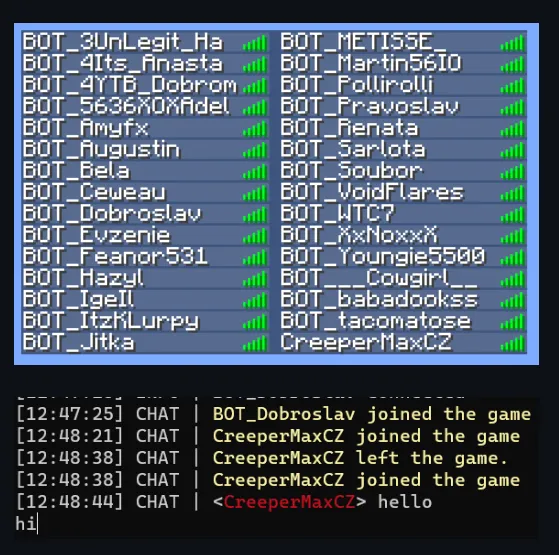
mc-bots is an open-source Minecraft bot stress tester written in Java. It creates fake players that connect to your server, take up player slots, send chat messages, run commands, and simulate basic player behavior.
Key points:
- Current version supports Minecraft 1.21.7 (compatible with 1.21.8 servers).
- Older Minecraft versions are available in the GitHub releases.
- Minimum Java version required: 17.
- Completely free and MIT licensed.
- Designed for educational and testing purposes only. The developer clearly states they are not responsible for any abuse.
It is especially useful for:
- Server owners who want to know the real player capacity of their machine.
- Plugin developers testing how their plugins behave with many online players.
- Minigame creators checking stability under load.
- Anyone preparing a public server launch.
Main Features of MC-Bots
Here are the most useful features that make mc-bots stand out for Minecraft server stress testing:
- Connect as many bots as you want (limited only by your hardware and the target server).
- Support for SOCKS4 and SOCKS5 proxies (load from file or URL).
- Colored or non-colored chat reception.
- Adjustable connection delay between bots.
- Automatic messages or commands sent on join.
- Random or real-looking nicknames (or load nicknames from a file).
- Online (premium) account support via Microsoft login.
- Ability to control all bots or selected individual bots.
- Minimal modes (-m and -x) for better performance when using hundreds of bots.
- Optional gravity simulation and auto-respawn.
How to Install and Run MC-Bots
- Make sure you have Java 17 or higher installed.
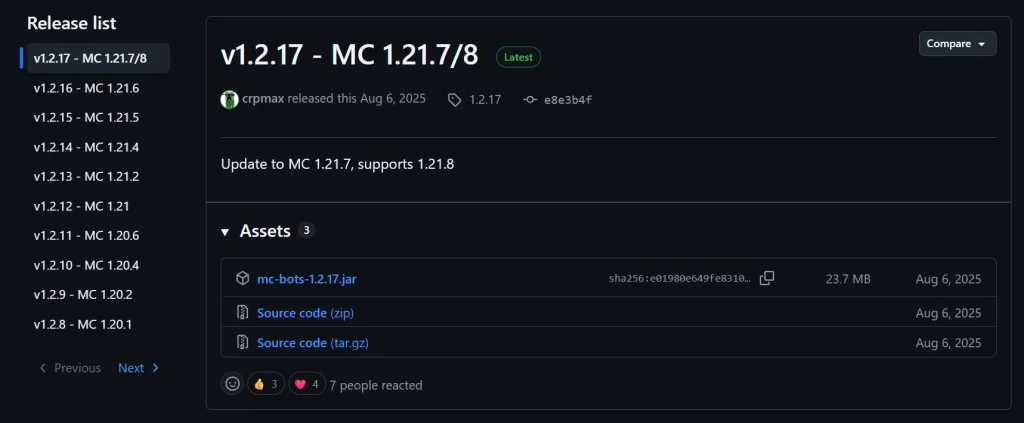
- Go to the official GitHub releases page: https://github.com/crpmax/mc-bots/releases
- Download the latest JAR file (for example mc-bots-1.2.17.jar).
- Open a terminal or command prompt in the folder where the JAR is located.
- Run the basic command:
Bash
java -jar mc-bots-1.2.17.jar -s your.server.ip:25565This connects one bot using default settings.
Practical Examples
Basic stress test with 30 bots:
Bash
java -jar mc-bots-1.2.17.jar -s 192.168.0.189:25565 -p BOT_ -d 4000 5000 -c 30 -r- Connects 30 bots
- Uses real-looking nicknames with the prefix BOT_
- Connection delay between 4–5 seconds
High-volume test (minimal mode for better performance):
Bash
java -jar mc-bots-1.2.17.jar -s play.example.com -c 200 -x -d 2000 3000The -x flag disables most listeners for maximum bot count with lower resource usage.
Using proxies:
Bash
java -jar mc-bots-1.2.17.jar -s yourserver.com -c 50 -t SOCKS5 -l proxies.txtUseful Command-Line Options
| Option | Description | Example |
|---|---|---|
| -c <count> | Number of bots | -c 50 |
| -d <min> <max> | Connection delay range (ms) | -d 3000 6000 |
| -p <prefix> | Nickname prefix | -p TestBot_ |
| -r | Real-looking nicknames | -r |
| -j <msg> | Join messages/commands | -j /register pass123 && /login pass123 |
| -m | Minimal mode (no chat) | -m |
| -x | Most minimal mode | -x |
| -o | Online (premium) accounts | -o |
| –nicks <file> | Nickname list from file | –nicks nicks.txt |
While the tool is running, you can type normal chat messages in the terminal (they will be sent by all bots) or use special commands:
- .list or .ls – list connected bots
- .control <nick> – control specific bots
- .exit or .leave – disconnect bots
Best Practices for Safe and Effective Stress Testing
- Always test on your own server or with explicit permission.
- Start with a small number of bots and gradually increase.
- Monitor server TPS, memory usage, CPU, and network during the test.
- Use the minimal modes (-m or -x) when testing very high player counts.
- Combine with tools like Spark or Spark Profiler for deeper performance insights.
- Remember the disclaimer: this tool can be misused as a spam/flood tool. Use it responsibly.
Why Minecraft Server Stress Testing Matters
Many server owners only discover problems after players start joining. Common issues include:
- Plugin lag under high player counts
- Memory leaks that appear only after 50+ players
- Poor anti-cheat performance
- Network bottlenecks
- Database or economy plugin failures
Running controlled stress tests with tools like mc-bots helps you fix these problems before they affect real players.
Frequently Asked Questions
Is mc-bots free? Yes. It is completely free and open source under the MIT license.
What Minecraft versions does it support? The latest release supports 1.21.7/1.21.8. Older versions are available in the releases section on GitHub.
Can I use premium (online-mode) accounts? Yes. Use the -o flag for Microsoft account login support.
Is it legal to use mc-bots? Using it on servers you own or have permission to test is fine. Using it to attack or disrupt other servers is against most server rules and can be illegal.
Does it work with proxies? Yes. It supports both SOCKS4 and SOCKS5 proxies loaded from a file or URL.
Can the bots actually play the game? They can send chat, run commands, and simulate basic movement (including optional gravity), but they are not full AI players. Their main purpose is load testing.
Final Thoughts
Minecraft server stress testing should be a regular part of preparing any serious server. mc-bots makes this process simple, free, and effective. Whether you’re launching a new public server, developing a complex plugin, or just want to know the real limits of your hardware, this tool gives you clear answers.
Download the latest version from the official repository, run a few tests, and make your server stronger before real players arrive.
Ready to improve your Minecraft server performance? Explore more guides and tools on Nomatali.