
CVE-2026-15748: Forminator File Upload Flaw

CVE-2026-15748 is a critical security vulnerability in the Forminator Forms WordPress plugin that can allow an unauthenticated attacker to perform an arbitrary file upload.
Under certain server configurations, the uploaded file can become executable, potentially leading to remote code execution (RCE) and full website compromise.
The vulnerability affects Forminator versions up to and including 1.56.1. Forminator 1.56.2 introduced the fix for the arbitrary file upload vulnerability. The plugin has since received additional releases, so administrators should use the latest available version rather than deliberately remaining on 1.56.2.
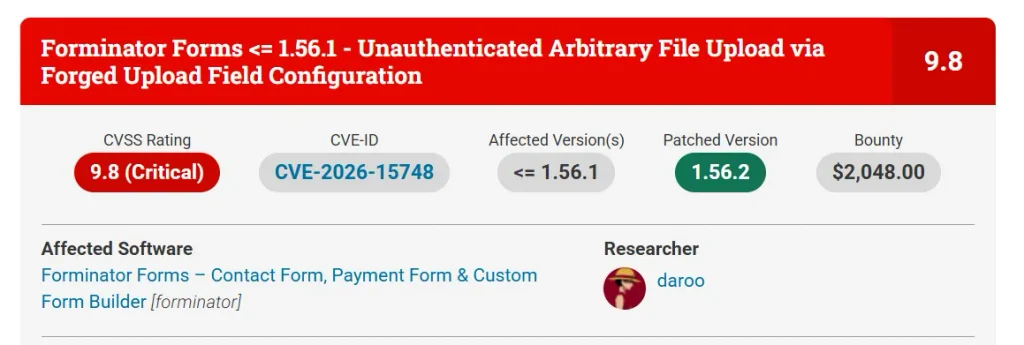
The vulnerability has a CVSS score of 9.8 (Critical) and does not require the attacker to have a WordPress account.
According to the public research, successful exploitation also depends on the vulnerable form configuration. In particular, the affected form needs both a File Upload field and a Select field.
Security note: This article explains the vulnerability for defensive research, patching, detection, and authorized lab testing. It intentionally does not provide a working webshell, command-execution payload, or instructions for attacking third-party websites.
CVE-2026-15748 at a Glance
- CVE: CVE-2026-15748
- Severity: Critical
- CVSS: 9.8
- Affected plugin: Forminator Forms
- Affected versions: 1.56.1 and earlier
- Fixed version: 1.56.2
- Current recommendation: Use the latest available Forminator release
- Authentication required: No
- Primary vulnerability: Unauthenticated arbitrary file upload
- Potential impact: Remote code execution and site compromise
- Important condition: Vulnerable forms require a File Upload field and a Select field
- Primary mitigation: Update Forminator and review upload-directory security
WordPress.org’s changelog specifically identifies “Arbitrary file upload vulnerability” as a fix in Forminator 1.56.2.
What Is CVE-2026-15748?
CVE-2026-15748 is a vulnerability in how Forminator processes submitted form data and file-upload configuration.
At a high level, the problem involves a trust boundary failure.
A web application receives information from a visitor and should treat that information as untrusted input.
Form configuration, on the other hand, should come from trusted data stored by the application.
The vulnerability occurs because, under the affected processing path, attacker-controlled form data can influence information that is later treated as upload configuration.
That creates a dangerous chain:
Untrusted form data
→ forged field information
→ upload processing
→ insufficient file-type validation
→ arbitrary file upload
→ potential code execution
The final RCE stage depends on server-side conditions, so it is important not to describe every vulnerable installation as automatically exploitable for RCE.
Why Is CVE-2026-15748 Rated Critical?
The vulnerability is particularly serious for three reasons.
1. No WordPress login is required or Unauthenticated
The vulnerable functionality is exposed through public form submission.
An attacker does not necessarily need:
- an administrator account;
- an editor account;
- a subscriber account;
- or another authenticated WordPress identity.
That makes the attack surface significantly larger than a vulnerability restricted to authenticated administrators.
2. The vulnerability involves file uploads
File upload functionality is already a sensitive part of a web application.
A normal contact form might only need:
- JPG;
- PNG;
- PDF.
If an attacker can manipulate the validation process and cause an unexpected file type to be accepted, the impact can become much more serious.
3. RCE is possible under additional conditions
If an uploaded server-side script reaches a web-accessible location where the web server is willing to execute it, arbitrary code execution can become possible.
That can potentially lead to:
- website defacement;
- malicious code injection;
- credential theft;
- database access;
- persistence;
- malware deployment;
- or complete WordPress compromise.
Which Forminator Versions Are Vulnerable?
The vulnerability affects:
Forminator ≤ 1.56.1
The security fix for the arbitrary file upload issue was released in:
Forminator 1.56.2
However, Forminator has released additional versions after 1.56.2. For example, the WordPress.org changelog currently lists later security-related releases, including 1.57.1. Therefore, the safest recommendation is to update to the latest compatible release, rather than treating 1.56.2 as the final version to use.
What Is the Root Cause?
The vulnerability is best understood as a chain of multiple weaknesses rather than one isolated validation bug.
1. Untrusted Nested Field Data
Forminator processes structured data representing submitted form fields.
The affected code path can encounter nested data supplied through a Select field.
The security problem is that some of this data can survive processing and reach later stages in a form that resembles legitimate field configuration.
Conceptually:
User submission
      ↓
Nested field data
      ↓
Field processing
      ↓
Upload processing
The application should maintain a strict boundary between:
User-controlled valuesand:
Server-controlled field configurationCVE-2026-15748 demonstrates what can happen when that boundary is not enforced correctly.
2. The Select Field Acts as a Carrier
The Select field itself is not inherently dangerous.
The problem is how its submitted data is processed.
According to the published research, a specially structured Select value can cause Forminator’s internal processing to retain information that resembles a field record.
That record can contain information associated with an upload field.
This is why the vulnerability is sometimes described as an attack involving a forged upload field configuration via a Select field. Wordfence’s vulnerability database describes the issue as an unauthenticated arbitrary file upload via forged upload field configuration.
The important security lesson is:
Never allow user-controlled form data to redefine security-sensitive application configuration.
3. Upload Processing Trusts the Forged Configuration
The next stage involves Forminator’s upload-processing logic.
The application eventually reaches the upload handler with information that should have represented trusted configuration.
Instead, part of that information can originate from the manipulated submission.
Conceptually:
Normal flow:

Stored form configuration
        ↓
Upload handler
        ↓
Validate upload
The vulnerable flow can become:
User-controlled submission
        ↓
Forged field information
        ↓
Upload handler
        ↓
Validation
That distinction is the heart of the vulnerability.
The security control is being applied after the attacker has already influenced the configuration that determines how the upload is processed.
4. The File-Type Validation Can Be Bypassed
The vulnerability also involves the way Forminator handles dangerous file types.
The affected validation logic uses a blocklist for dangerous extensions.
A security blocklist can look reasonable at first:
Reject dangerous extensionBut file-type validation becomes more complicated when one part of the application interprets values literally while another part interprets them as patterns.
The published research shows that this mismatch can allow an alternative representation to survive the blocklist while still matching a dangerous extension during later validation.
This is an important lesson for developers:
A blacklist is only as strong as every parser and matching rule behind it.
Why Allowlisting Is Better for File Uploads
Suppose a website has a profile-photo form.
It needs:
.jpg
.jpeg
.png
A weak approach is:
Allow everything except known dangerous types.A stronger approach is:
Allow only the exact file types required by the application.Even then, extension checking alone should not be considered sufficient.
A robust upload design should consider:
- allowed extensions;
- detected MIME type;
- actual file contents;
- generated filenames;
- storage location;
- permissions;
- web-server execution rules;
- and access controls.
Does CVE-2026-15748 Require a Specific Form?
Yes.
The public research indicates that the vulnerable form needs both:
- a File Upload field
- a Select field
The Select field acts as the carrier in the attack chain, while the File Upload field provides the functionality that eventually processes the forged upload configuration.
This does not mean that every Forminator installation with those fields has already been compromised.
It means those configurations deserve particular attention when assessing exposure.
Most importantly, administrators should not rely on removing a Select field as their primary defense.
Patch the plugin.
Arbitrary File Upload vs. RCE
These two terms are often mixed together, but they describe different stages.
Arbitrary File Upload
The application accepts a file that should have been rejected.
For example, a form intended to accept images accepts an unexpected server-side file type.
Remote Code Execution
The uploaded file is subsequently interpreted by the server as executable code.
Therefore:
Arbitrary file upload
        ≠
Automatic RCE
RCE requires additional conditions.
This distinction matters because the default Forminator upload directory has additional protections designed to prevent PHP execution. Public reporting has highlighted that custom upload storage configurations can create different security conditions.
Why the Upload Directory Matters
A secure application should not execute user-uploaded files as server-side code.
For example:
User uploads file
       ↓
Storage directory
       ↓
Web server
       ↓
File treated as data
is significantly safer than:
User uploads file
       ↓
Web-accessible executable directory
       ↓
Web server executes file
The latter can turn a file-upload vulnerability into code execution.
The public analysis of CVE-2026-15748 notes that Forminator’s default upload location includes an .htaccess protection intended to prevent PHP execution, while custom upload storage can introduce different conditions.
Therefore, administrators using custom storage paths should verify that equivalent server-side protections are present.
How to Check Whether Your WordPress Site Is Vulnerable
You do not need to run an exploit to perform an initial assessment.
Step 1: Check the Forminator Version
Go to:
WordPress Dashboard → Plugins → Installed Plugins
Find:
Forminator Forms
If the site is running:
1.56.1 or earlier
treat it as potentially vulnerable and prioritize the update.
Step 2: Update Forminator
Install the latest compatible release.
The arbitrary file upload fix was introduced in 1.56.2, but later versions have also been released.
Step 3: Identify Public Forms
Make an inventory of forms that:
- are publicly accessible;
- accept submissions without login;
- contain File Upload fields;
- contain Select fields;
- use custom upload storage.
These forms deserve additional review.
Step 4: Review Upload Storage
Determine where Forminator stores uploaded files.
Pay particular attention to custom storage roots.
Verify that uploaded content cannot be interpreted as executable server-side code.
Safe Lab Reproduction
Security researchers and pentesters can reproduce the vulnerability in an isolated environment.
A simple lab can contain:
Docker / VM
    │
    ├── WordPress
    │
    ├── Forminator 1.56.1
    │
    └── Test Form
          ├── Select
          └── File Upload
Use a local hostname such as:
wordpresslab.testThe lab should not expose the vulnerable WordPress instance to the public Internet.
What Should the Test Prove?
A safe reproduction does not need to execute operating-system commands.
The important question is:
Can an input that should be rejected reach the file-storage stage?
A defensive test can therefore use a harmless marker file and verify whether the application’s validation behaves correctly.
The desired result is:
Unexpected file
      ↓
Validation
      ↓
Rejected
A vulnerable result would be:
Unexpected file
      ↓
Validation
      ↓
Accepted / stored
That is already enough to demonstrate a security failure in a controlled environment.
There is no need to deploy a webshell simply to prove that the upload validation is broken.
What Pentesters Should Avoid
A public PoC can be useful for understanding a vulnerability, but that does not automatically make every part of the PoC appropriate for every target.
For an authorized engagement, distinguish between:
Vulnerability verification
Prove that the vulnerable condition exists.
Impact demonstration
Show what the vulnerability could lead to.
Full exploitation
Actually execute attacker-controlled code.
These are three different levels of testing.
If the rules of engagement only authorize vulnerability validation, do not escalate to command execution.
A good pentest report should provide enough evidence for the client to understand the risk without unnecessarily compromising their system.
Detection and Threat Hunting
Patching is the first step.
It is not necessarily the last step.
Because this vulnerability can be exploited without authentication, administrators should consider checking whether suspicious activity occurred before the patch was installed.
Review Web Server Logs
Look for unusual POST requests involving Forminator submission endpoints.
Pay attention to:
- unexpected request frequency;
- unusual field structures;
- repeated submissions from the same source;
- suspicious upload activity;
- requests immediately followed by access to newly created files.
Review Upload Directories
Look for files that:
- do not match the form’s intended file types;
- have unexpected extensions;
- were created at unusual times;
- have unfamiliar names;
- are not associated with legitimate submissions.
Review File Timestamps
Correlate suspicious files with:
- web access logs;
- WordPress logs;
- WAF events;
- plugin submissions;
- administrator activity.
A file appearing in an upload directory is not automatically proof of exploitation. Correlation is important.
What If You Find a Suspicious File?
Do not immediately delete everything.
If an incident may have occurred, preserve evidence first.
A reasonable process is:
- Isolate the suspicious file.
- Record its path and timestamps.
- Calculate a hash for evidence tracking.
- Review web-server access logs.
- Check whether the file was requested.
- Inspect WordPress core, plugins, and themes.
- Review administrator accounts.
- Check for unexpected scheduled tasks or persistence.
- Remove or quarantine confirmed malicious files.
- Rotate credentials if compromise is suspected.
- Restore from a known-clean backup if necessary.
If there is evidence that attacker-controlled code executed on the server, treat the event as a potential full website compromise rather than simply a vulnerable-plugin issue.
How to Mitigate CVE-2026-15748
1. Update Forminator
This is the most important step.
Upgrade from:
1.56.1 or earlier
to the latest compatible Forminator release.
The vulnerability was fixed in 1.56.2, while newer Forminator releases have subsequently been published.
2. Review Custom Upload Storage
If the site uses a custom upload directory, verify its security configuration.
Do not assume that a custom directory automatically receives the same protections as the plugin’s default storage location.
3. Prevent Script Execution in Upload Directories
Uploaded files should be treated as data, not executable application code.
The web server should be configured accordingly.
4. Use Strict File Allowlisting
Only permit file types that the form actually requires.
For example:
Profile photo:
JPEG / PNG
rather than:
Everything except known dangerous extensions5. Monitor After Patching
Review logs and upload directories for suspicious activity that may have happened before the update.
CVE-2026-15748 Detection Checklist
- Check the installed Forminator version
- Identify versions 1.56.1 and earlier
- Update Forminator
- Identify public forms
- Identify forms with File Upload fields
- Identify forms with Select fields
- Review custom upload storage
- Verify upload directories cannot execute server-side scripts
- Review recently created files
- Review Forminator submission logs
- Review web-server access logs
- Check for unexpected administrator accounts
- Check WordPress core, themes, and plugins for unauthorized changes
- Preserve evidence if suspicious activity is found
- Rotate credentials if compromise is confirmed
Frequently Asked Questions
What is CVE-2026-15748?
CVE-2026-15748 is a critical unauthenticated arbitrary file upload vulnerability affecting the Forminator Forms WordPress plugin.
What is the CVSS score?
The vulnerability has a CVSS score of 9.8, rated Critical.
Which Forminator versions are affected?
Forminator versions 1.56.1 and earlier are affected by the arbitrary file upload vulnerability.
Which version fixes CVE-2026-15748?
The vulnerability was fixed in Forminator 1.56.2. Since newer versions are available, administrators should install the latest compatible release.
Does CVE-2026-15748 require authentication?
No. The vulnerability is classified as unauthenticated, meaning an attacker does not need to log in to WordPress to reach the vulnerable submission path.
Does every Forminator website have the same risk?
No. Exploitability depends on the form configuration and server environment. Public research identifies forms containing both a Select field and a File Upload field as an important condition.
Can CVE-2026-15748 lead to RCE?
Yes, under certain conditions. Arbitrary file upload can become RCE when the uploaded server-side file is placed somewhere that allows execution by the web server. The default upload protections can reduce this risk, while custom storage configurations require additional review.
Is arbitrary file upload the same as RCE?
No.
Arbitrary file upload means the application accepts a file that should have been rejected.
RCE means an attacker can make the server execute attacker-controlled code.
RCE is therefore a possible consequence of an upload vulnerability, not a synonym for it.
Do I need to run the PoC to check my website?
No.
Checking the Forminator version and updating the plugin is the safest first step. You can then review your forms, upload directories, and logs.
Is it safe to test the public PoC?
Only on systems you own or where you have explicit authorization.
For production environments, a benign validation test is preferable when the engagement does not explicitly authorize code execution.
What should I do if I was running Forminator 1.56.1 before the patch?
Update immediately and then investigate for possible prior exploitation.
Pay particular attention to public forms containing File Upload and Select fields, custom upload storage, unexpected files, and web-server logs.
Final Takeaway
CVE-2026-15748 should be treated as a high-priority WordPress security issue.
The vulnerability combines multiple weaknesses in Forminator’s handling of submitted field data and file-upload configuration. An unauthenticated attacker can potentially manipulate a public form submission to reach an arbitrary file-upload condition.
The situation becomes more serious when the uploaded file can be executed by the web server, creating a path toward remote code execution.
But there is an important distinction:
Arbitrary file upload does not automatically equal RCE.
Server configuration matters.
That is why administrators should address both sides of the problem:
Patch the vulnerable plugin
and
secure the upload environment.
The first fixed release was Forminator 1.56.2, but because later versions are available, the practical recommendation in 2026 is to update to the latest compatible Forminator release rather than stopping at the minimum patched version.
After updating, review:
- public Forminator forms;
- File Upload and Select configurations;
- custom upload directories;
- unexpected uploaded files;
- web-server access logs;
- WordPress file integrity;
- administrator accounts.
For security researchers, the vulnerability is best reproduced in an isolated lab. A strong security test does not need to deploy a webshell or execute operating-system commands against a production system.
The goal is to demonstrate the security weakness, establish its impact, and give the owner enough information to fix it—not to cause unnecessary damage.
References
- Wordfence vulnerability database — CVE-2026-15748 details and affected versions.
- WPScan vulnerability database — Forminator <1.56.2 arbitrary file upload advisory.
- Public security reporting — additional context on the vulnerability and RCE conditions.
Read more my article, find out and visit my website (Nomatali). Thank you